How to use this page
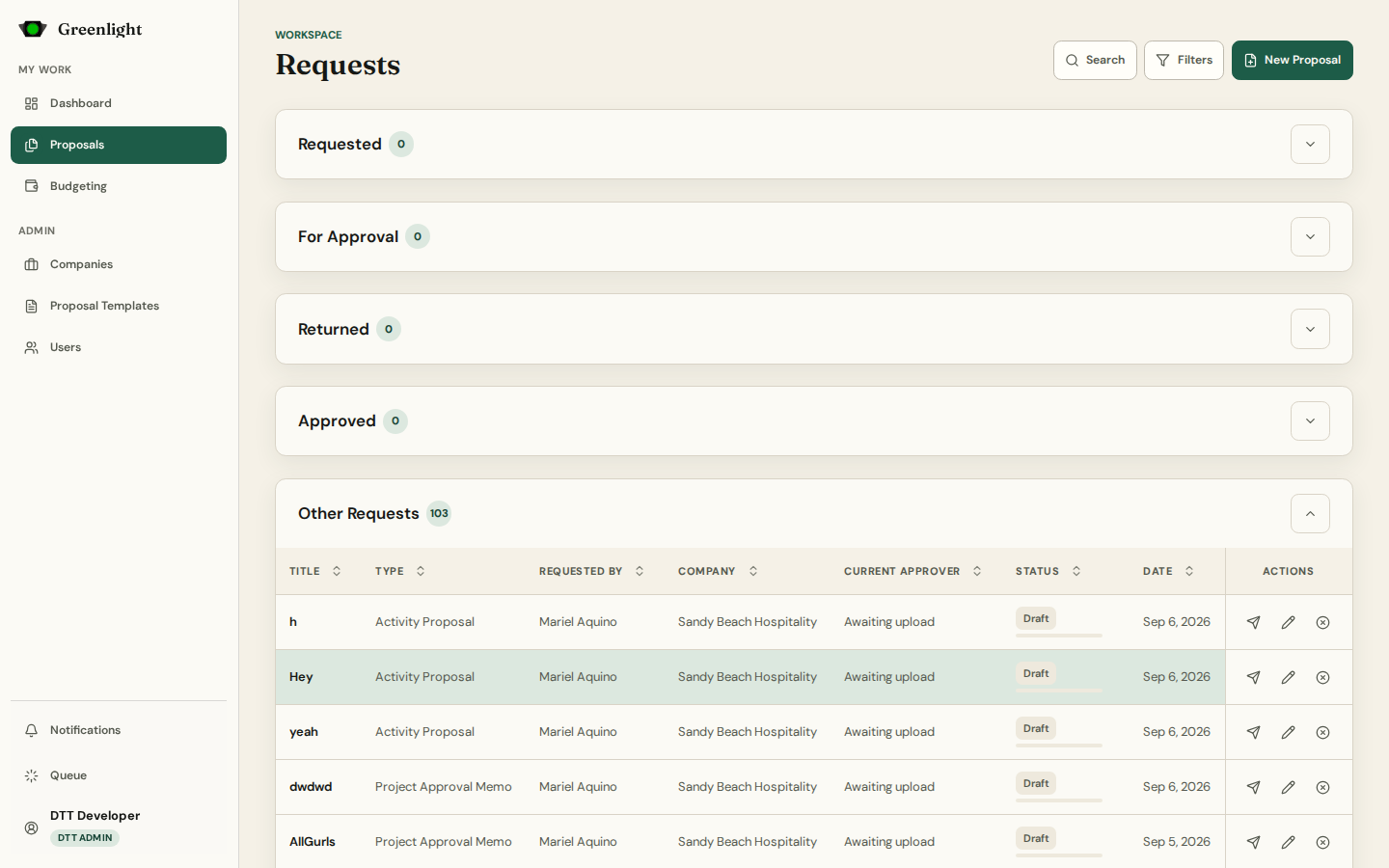
- 1 Requested holds the papers you created and still own; For Approval the ones waiting for your decision; Returned the ones you sent back; Approved the ones you approved.
- 2 Other Requests lists everything else in your companies, for viewing. Administrators see every company.
- 3 Search matches titles; Filters narrow by type, company, status, requester, approver, and date. Active filters show as chips you can clear one by one.
- 4 Columns sort. The status pill carries a progress bar; Current approver tells you who holds the next action.
- 5 Row actions: open, edit a draft, submit or resubmit, cancel. Administrators also get Void and Halt for a running chain.
- 6 Links from the dashboard and from notifications land on the matching lane (#requested, #needs-attention, #returned, #approved, #other).
Reading a status
- Draft: not yet in the chain — the requester can still edit and submit.
- In Review: the chain is running; the listed approver is next.
- Returned: sent back for revision; the requester revises and resubmits the same record.
- Approved, Cancelled, Voided: terminal. Void reverses an approved paper and its budget draw.
Names and links
- The sidebar and the address say Proposals; the page heading still reads Requests. They are the same workspace.
- /requests still opens it; it redirects to /proposals.
- Purchase Requests and Purchase Orders are not listed here — they live in Budgeting.